
Introduction
Salesforce Summer ’26 introduces one of the most developer-friendly Apex enhancements in recent years — Multiline Strings and the new String.template() method.
Until now, developers had to rely heavily on string concatenation (+) or index-based String.format() calls while building JSON payloads, SOQL queries, HTML templates, emails, or long text blocks. As a result, Apex code often became difficult to read, debug, and maintain.
However, with this new feature, writing large text blocks in Apex becomes significantly cleaner and more readable.
What’s New in Summer ’26?
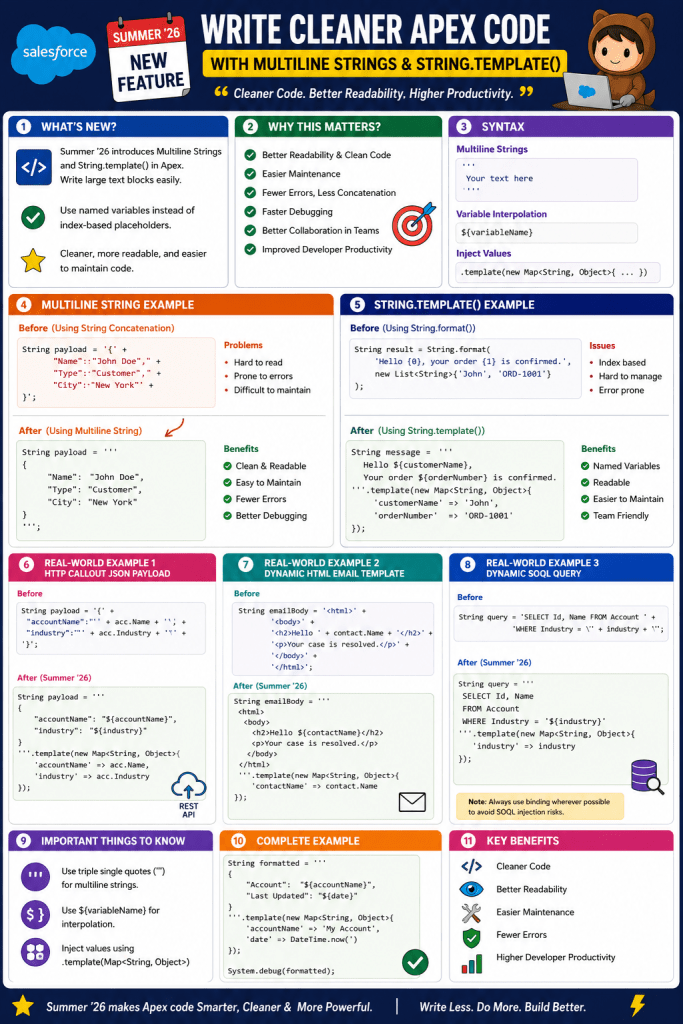
Salesforce now allows developers to:
- Create multiline strings using triple single quotes (
''') - Perform named variable interpolation using
String.template() - Avoid repetitive string concatenation
- Replace index-based placeholders from
String.format()
This feature is available in all API versions and works in both Lightning Experience and Salesforce Classic.
1. Multiline Strings in Apex
Previously, developers had to write long strings like this:
String payload = '{' + '"Name":"John Doe",' + '"Type":"Customer",' + '"City":"New York"' +'}';
Although functional, this approach quickly becomes messy for large payloads.
Summer ’26 Way ✅
Now you can directly write formatted multiline strings using triple quotes:
String payload = '''{ "Name" : "John Doe", "Type" : "Customer", "City" : "New York"}''';
As a result:
- The code becomes cleaner
- JSON payloads become readable
- Maintenance becomes easier
- Debugging improves significantly
2. String.template() — Named Variable Interpolation
Salesforce also introduced the new String.template() method.
Previously, developers used String.format() like this:
String result = String.format( 'Hello {0}, your order {1} is confirmed.', new List<String>{'John', 'ORD-1001'});
The major issue here is that developers must remember placeholder indexes ({0}, {1}, etc.).
Therefore, maintaining large templates becomes difficult.
Summer ’26 Solution ✅
Now developers can use descriptive variable names:
String message = '''Hello ${customerName},Your order ${orderNumber} is confirmed.'''.template(new Map<String, Object>{ 'customerName' => 'John', 'orderNumber' => 'ORD-1001'});
This approach is:
- More readable
- Easier to maintain
- Less error-prone
- Better for team collaboration
Benefits Over Existing Apex Code
1. Better Readability
Large JSON or HTML blocks now look exactly like their final output.
Before
String body = '<html>' + '<body>' + '<h1>Hello</h1>' + '</body>' + '</html>';
After
String body = '''<html> <body> <h1>Hello</h1> </body></html>''';
2. Easier Maintenance
With named placeholders, developers no longer need to track numeric indexes.
Old Approach
String.format('User {0} created account {1}', values);
New Approach
'''User ${userName} created account ${accountName}'''.template(valueMap);
As a result, future modifications become safer and faster.
3. Reduced Concatenation Errors
Previously, developers frequently missed:
- commas
- quotes
- spaces
- newline characters
Now the structure remains intact naturally.
4. Cleaner HTTP Integrations
This enhancement is especially useful while working with:
- REST API payloads
- GraphQL requests
- Email templates
- Dynamic SOQL
- HTML generation
- Logging frameworks
Real-World Example 1 — HTTP Callout JSON Payload
Before Summer ’26
String payload = '{' +'"accountName":"' + acc.Name + '",' +'"industry":"' + acc.Industry + '"' +'}';
This becomes difficult to manage for larger payloads.
After Summer ’26 ✅
String payload = '''{ "accountName": "${accountName}", "industry": "${industry}"}'''.template(new Map<String, Object>{ 'accountName' => acc.Name, 'industry' => acc.Industry});
Why This Is Better
- Cleaner integration code
- Easier debugging
- Faster onboarding for new developers
- Reduced formatting mistakes
Real-World Example 2 — Dynamic HTML Email Template
Before
String emailBody = '<html>' +'<body>' +'<h2>Hello ' + contact.Name + '</h2>' +'<p>Your case is resolved.</p>' +'</body>' +'</html>';
After Summer ’26 ✅
String emailBody = '''<html> <body> <h2>Hello ${contactName}</h2> <p>Your case is resolved.</p> </body></html>'''.template(new Map<String, Object>{ 'contactName' => contact.Name});
Benefits
- HTML structure remains readable
- Easier collaboration with frontend/email teams
- Simpler future enhancements
Real-World Example 3 — Dynamic SOQL Query Construction
Before
String query = 'SELECT Id, Name FROM Account ' + 'WHERE Industry = \'' + industry + '\'';
After Summer ’26 ✅
String query = '''SELECT Id, NameFROM AccountWHERE Industry = '${industry}''''.template(new Map<String, Object>{ 'industry' => industry});
Benefits
- Cleaner query formatting
- Better readability
- Easier debugging of complex queries
Note: Always use binding wherever possible to avoid SOQL injection risks.
Important Things to Know
Multiline String Syntax
Use triple single quotes:
'''Your Text Here'''
Variable Interpolation Syntax
Use:
${variableName}
inside the string.
Inject Values Using
.template(Map<String, Object>)
Complete Example
String formatted = '''{ "Account": "${accountName}", "Last Updated": "${date}"}'''.template(new Map<String, Object>{ 'accountName' => 'My Account', 'date' => DateTime.now()});System.debug(formatted);
Final Thoughts
The new Multiline Strings and String.template() functionality in Salesforce Summer ’26 is a major quality-of-life improvement for Apex developers.
Although the feature looks simple at first glance, it significantly improves:
- code readability
- maintainability
- developer productivity
- collaboration
- integration development
Most importantly, it helps Apex code look modern and structured, similar to features already available in many popular programming languages.
If your project contains:
- large JSON payloads
- complex email templates
- dynamic queries
- REST integrations
- HTML generation
then this Summer ’26 enhancement will immediately improve your development experience.
Summary

 Welcome to The Salesforce Dev
Leave a comment