
Introduction
Hi everyone, welcome to this Summer ’26 Apex blog post! In this article, we’ll explore a major security enhancement introduced by Salesforce.
In our previous blog – How to Enforce Apex Security in Salesforce: A Developer’s Guide, we mentioned the various ways of security in apex. Now with the Summer 26 release, Salesforce has introduced a secure-by-default Apex execution model from API version 67 onward. This release changes the Apex behavior changes significantly in terms of data access and sharing enforcement.
Previously, Apex executed in System Mode by default, which ignored user permissions. However, with this update, Salesforce is shifting toward a User Mode-first approach, thereby ensuring better data protection automatically.
Whether you are working on Apex classes, integrations, or enterprise-level solutions, this update not only simplifies security handling but also reduces risks significantly.
In this post, we’ll explore:
- What changed in Summer ’26
- Old vs New behavior
- Database access changes
- Sharing rule enforcement updates
- Deprecation of old security patterns
- Best practices
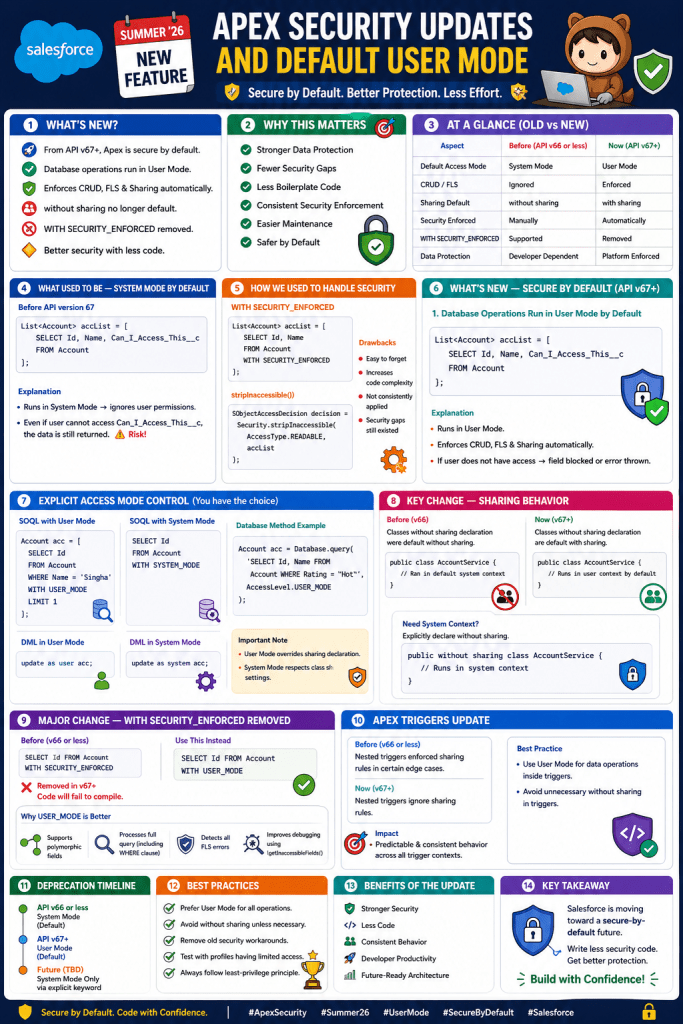
What Used to Be — System Mode by Default
Before API version 67, Apex behavior was quite different.
✔ Apex ran in System Mode
✔ It ignored CRUD and Field-Level Security (FLS)
✔ Classes defaulted to without sharing
As a result, developers had to manually enforce security, which often led to inconsistencies.
Example — Old Behavior (API v66 or less)
List<Account> accList = [
    SELECT Id, Name, Can_I_Access_This__c
    FROM Account
];
Explanation
In API version 66, the above query runs in System Mode. Therefore, user permissions are ignored entirely.
Even if the user: Does NOT have access to Can_I_Access_This__c
👉 The data is still returned
Consequently, this creates a serious risk of exposing sensitive data.
Limitations of Old Approach
Although System Mode provides flexibility, it introduces several challenges.
- First, sensitive data exposure becomes a major risk
- Additionally, manual enforcement increases development effort
- Moreover, boilerplate code becomes repetitive
- As a result, security implementation becomes inconsistent
- Finally, maintenance becomes difficult in large codebases
How We Used to Handle Security
To overcome these limitations, developers relied on additional mechanisms.
WITH SECURITY_ENFORCED
List<Account> accList = [
    SELECT Id, Name
    FROM Account
    WITH SECURITY_ENFORCED
];
stripInaccessible()
SObjectAccessDecision decision = Security.stripInaccessible(
    AccessType.READABLE,
    accList
);
Drawbacks
However, these approaches were not ideal.
- For instance, they were easy to forget
- In addition, they increased code complexity
- Furthermore, they were not consistently applied
- As a result, security gaps still existed
What’s New — Secure by Default (API v67+)
Now, with Summer ’26, Salesforce introduces a major shift.
From API version 67 onwards, Apex follows a secure-by-default paradigm.
1. Database Operations Run in User Mode by Default
From API v67 onward, database operations now run in User Mode instead of System Mode.
👉 This applies to:
- SOQL
- SOSL
- DML
- Database methods
Example — New Behavior (API v67)
List<Account> accList = [
    SELECT Id, Name, Can_I_Access_This__c
    FROM Account
];
Explanation
Now, the same query behaves differently.
- First, it runs in User Mode
- Consequently, it enforces:
- CRUD permissions
- Field-Level Security
- Sharing rules
👉 Therefore, if the user does not have access:
- The field is blocked, or
- The query throws an error
In other words, the same code now produces secure results automatically.
2. Explicit Access Mode Control
Even though Salesforce enforces security by default from API v67 onward, you still have control to set the access code.
SOQL with User Mode
Account acc = [
    SELECT Id
    FROM Account
    WHERE Name = 'Singha'
    WITH USER_MODE
    LIMIT 1
];
SOQL with System Mode
SELECT Id FROM Account WITH SYSTEM_MODE
DML in User Mode
update as user acc;
DML in System Mode
update as system acc;
Database Method Example
Account acc = Database.query(
    'SELECT Id, Name FROM Account WHERE Rating = \'Hot\'',
    AccessLevel.USER_MODE
);
Important Note
- On one hand, User Mode overrides sharing declaration
- On the other hand, System Mode respects class sharing settings
3. Key Change — Sharing Behavior
Another important change relates to sharing rules.
Before (v66)
- Apex classes without an explicit sharing declaration was default without sharing.
Example
public class AccountService
{
    //No sharing defined, so ran in default system context
}
Now (v67+)
- Apex classes without an explicit sharing declaration will be default with sharing
Example
public class AccountService {
    //No sharing defined, so will run now by default in user context
}
Due to this, now record-level access is enforced by default.
If you want to run class without sharing context from V67+, you need to explicitly declare the class as without sharing.
public without sharing class AccountService
{
    //No sharing defined, so ran in default system context
}
4. Major Change — WITH SECURITY_ENFORCED Removed
🚨 Another critical update, that from API version 67 onwards:
❌ WITH SECURITY_ENFORCED is removed
❌ Existing code will fail to compile
Replacement
SELECT Id FROM Account WITH USER_MODE
Why USER_MODE is Better
- First, it supports polymorphic fields
- Additionally, it processes the full query (including WHERE clause)
- Moreover, it detects all FLS errors
- Finally, it improves debugging using
getInaccessibleFields()
5. Apex Triggers Update
Another important update applies to triggers. Previously, nested triggers enforced sharing rules in certain edge cases
New Behavior
👉 All triggers will now:
✔ Always run in System Mode
✔ Ignore user permissions
Important Note
Since triggers cannot define sharing:
👉 You should move logic to handler classes
👉 This allows better control over:
- Sharing
- Access mode
Old vs New Comparison
| Feature | API v66 | API v67+ |
|---|---|---|
| Default Mode | System Mode | User Mode |
| Sharing Default | without sharing | with sharing |
| Security Enforcement | Manual | Automatic |
| WITH SECURITY_ENFORCED | Supported | ❌ Removed |
| Triggers | Mixed | Always System Mode |
Important Considerations
1. API Version Upgrade Impact
- First, behavior changes significantly
- Therefore, the same code may return different results
2. Test Classes
You must:
- Assign proper permissions
- Update test data
3. Explicit is Better
Although defaults are secure, you should:
- Explicitly define sharing
- Explicitly define access mode
When Should You Use This?
Recommended
- For UI-driven logic
- When handling secure data
- In business logic layers
Be Careful
- During admin operations
- In data migrations
- For integrations needing full access
Summary — Apex Security Evolution
To summarize, the Summer ’26 update introduces a true secure-by-default model:
✔ User Mode by default
✔ Sharing enforced automatically
✔ Deprecated insecure patterns
✔ Encourages intentional design


Leave a Reply