

Apex triggers can recurse when a trigger causes itself to execute repeatedly. This recursion potentially leads to infinite loops and hits Salesforce governor limits. This often happens when a trigger performs DML operations that invoke the same trigger again. To maintain system stability and data integrity, it’s crucial to implement strategies that prevent such recursive behavior.
This guide explores common methods to prevent recursion in Apex triggers, discussing their advantages, disadvantages, and practical use cases.
What is Trigger Recursion?
Trigger recursion occurs when a trigger causes additional DML operations, leading to repeated executions of the same trigger. This process can cause:
- Governor Limit Exceptions: Such as exceeding the maximum trigger depth.
- Performance Degradation: Due to repeated and unnecessary processing.
Some Example Scenarios of Trigger Recursion –
- Chained Triggers Across Objects:
- Trigger A updates Object B. This update triggers logic on Object B. It updates Object C or loops back to Object A. This causes cascading invocations.
- Trigger ↔ Workflow Field Update:
- A trigger updates a field. This activation triggers a workflow rule that updates the same record. This process re-triggers the original trigger.
- Apex Trigger ↔ Apex Trigger:
- An
afterinsert or after update trigger modifies same record. This causes the trigger to fire repeatedly. It continues until governor limits are hit or logic prevents further updates.
- An
1. Using a Static Set to Track Processed Records
Concept:
Maintain a static Set of record IDs i.e. Set<Id> that have been processed. Before processing a record, check if its ID exists in the Set.
Code Example:
public class AccountTriggerHandler {
    private static Set<Id> processedRecordIds = new Set<Id>();
}
trigger AccountTrigger on Account (after update) {
    for (Account acc : Trigger.new) {
        if (!AccountTriggerHandler.processedRecordIds.contains(acc.Id)) {
            AccountTriggerHandler.processedRecordIds.add(acc.Id);
            // Your logic here
        }
    }
}
Benefits:
- Prevents Recursion: Ensures the same record isn’t processed repeatedly in a single transaction, avoiding infinite loops.
- Transaction Scope: Retains value during a transaction and resets automatically afterward.
- Bulk-Safe: Suitable for bulk operations, efficiently tracking processed records.
- Memory Efficiency: Stores only record IDs, reducing memory usage.
- Simple Implementation: Easy to implement compared to alternatives.
Common Use Cases:
- One-Time Execution: Ensures specific logic runs only once per transaction.
- Cross-Context Sharing: Shares data between
beforeandaftertrigger contexts. - Duplicate Checking: Tracks processed records in complex logic.
Pros:
- Simple to use and understand.
- Avoids extra database operations or custom fields.
- Resets automatically after each transaction, ensuring scope control.
- Effective in bulk scenarios.
Cons:
- Limited to a single transaction and cannot persist state across transactions.
- Can make testing more complex if not properly managed or reset.
- May obscure behavior, making code harder for others to follow.
- Risk of heap space issues with large datasets.
- Not suitable for complex scenarios involving multiple objects
- Requires separate sets for different objects.
Example Scenario –
- Scenario: A trigger processes Contact records after update to update their Title field based on associated Account data. Also there is a workflow rule which updates the Title field of the Contact. It appends ” – Verified”. This is an example of recursion caused by the trigger and workflow field update. The Trigger ↔ Workflow Field Update: runs multiple times due to updates to the same object contact.
- Implementation: Use a static
Set<Id>to track processedContactIDs to ensure no duplicate updates during the same transaction. - Why This Works: Offers record-level control and prevents duplicate processing within the same transaction for a single trigger context.
Trigger Code Example with Recursion –
Consider this below Contact trigger, which updates the title based on Account Name.
To update an contact, simulate the recursion scenario via an anonymous window in the developer console. The trigger gets call multiple times and gets into recursion due to workflow update triggering updates again. This ultimately result in apex trigger depth error.
// Create a Contact
Contact contact = new Contact(FirstName = '1',
                              LastName = '1',
                              AccountId= '001Ws00003rvMGiIAM');
insert contact;

contact.LastName = 'Test';
update contact;
How it works :
- When a Contact is updated, the trigger fires and updates the Title.
- The update to Title causes the workflow rule to fire, which again updates the Title.
- This workflow update, triggers the after update trigger again.
- The process repeats, causing an infinite loop until Salesforce enforces a limit and throws the “maximum trigger depth exceeded” error.

Trigger Code Example with Recursion FIX using Set –
Now, this is the below Contact trigger, with the recursion fix using set.
To update an contact, simulate the recursion scenario via an anonymous window in the developer console. The trigger gets call 3 times. 1 time due to an actual update in anonymous. 2 times due to a workflow field update. However, the actual logic of updating the title only runs once.
// Create a Contact
Contact contact = new Contact(FirstName = '1',
                              LastName = '1',
                              AccountId= '001Ws00003rvMGiIAM');
insert contact;

contact.LastName = 'Test';
update contact;
How it works:
- When the trigger fires, it calls ContactTriggerHandler.handleAfterUpdate.
- For each Contact, before updating, it checks if the Contact’s Id is in processedContacts.
- If not, it updates the Contact and adds the Id to processedContacts.
- This ensures each Contact is only processed once per transaction, breaking the recursion loop.

2. Using a Static Map of Trigger Event Keys
Concept:
For more complex scenarios, use a static Map to track additional information about processed records.
Code Example:
public class TriggerUtility {
    private static Map<String, Boolean> processedRecords = new Map<String, Boolean>();
	public static Boolean runCode(String key) {
        if (processedRecords.containsKey(key) && processedRecords.get(key)) {
            return false;
        } else {
            return true;
        }
    }
}
trigger AccountTrigger on Account (after update) {
	if (TriggerUtility.runCode('Account_AfterUpdate')) {
		// Your logic here
    }
}
Pros:
- Allows storing additional data about each record.
- Useful for complex processing logic.
Cons:
- Increased complexity in implementation.
- Higher memory usage compared to a Set.
- Requires consistent and unique naming of event keys, which can lead to confusion in larger teams.
Example Scenario –
- Scenario: You have a trigger on
Opportunity. It processes records differently based on whether the trigger is running inbefore updateorafter insert. This is an example of recursion caused by the same trigger. The Apex Trigger ↔ Apex Trigger runs multiple times due to updates to the same object opportunity. - Implementation: Use a static
Map<String, Boolean>where keys represent unique event types (e.g.,Opportunity_BeforeUpdate,Opportunity_AfterInsert). - Why This Works: Enables precise control over logic execution for specific trigger contexts, preventing duplicate logic execution across multiple contexts.
Trigger Code Example with Recursion –
Consider this below Opportunity trigger, which updates the amount on insert and also updates the description on update.
To create and update an opp, simulate the recursion scenario via an anonymous window in the developer console. The after insert action happens only once. The before update trigger fires twice.
// Create a new Opportunity
Opportunity opp = new Opportunity(Name = 'Test Opportunity', StageName = 'Prospecting', CloseDate = Date.today());
insert opp;

// Update the Opportunity to trigger both contexts
opp.StageName = 'Closed Won';
update opp;
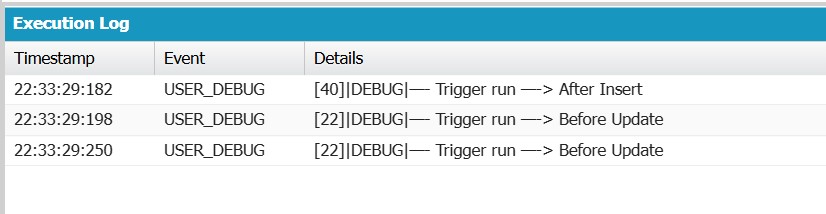
How it works :
- When an Opportunity is updated, the before update trigger fires. It checks if the StageName is ‘Closed Won’. Then, it verifies if the Description is null.
- If both conditions are true, the trigger updates the Description field to ‘Automatically updated on Closed Won.’.
- When an Opportunity is created, the after insert trigger fires and checks if the Amount field is null. If the Amount is null, the trigger updates it to a default value of 1000.
- The update to the Amount field causes the before update trigger to execute again. This is because the update counts as a modification.
- The before update logic runs and checks the StageName and Description conditions again, potentially updating the Description field.
- This update to the Description field can further trigger the after insert logic. This happens if other conditions are met. It creates a cycle of trigger executions.
Trigger Code Example with Recursion FIX using Static Map –
Now, this is the below Opportunity trigger, with the recursion fix using static map.
To create and update an opp, simulate the recursion scenario via an anonymous window in the developer console. The after insert action happens only once. The before update trigger also fires only once.
// Create a new Opportunity
Opportunity opp = new Opportunity(Name = 'Test Opportunity', StageName = 'Prospecting', CloseDate = Date.today());
insert opp;

// Update the Opportunity to trigger both contexts
opp.StageName = 'Closed Won';
update opp;

How it works :
- When an Opportunity is updated, the before update trigger fires.
- It checks if the StageName is ‘Closed Won’ and the Description is null.
- If true, it updates the
Descriptionto ‘Automatically updated on Closed Won.’.
- When an Opportunity is created, the after insert trigger fires.
- It checks if the
Amountis null. - If true, it updates the
Amountto 1000.
- It checks if the
- The update to the Amount field triggers the before update logic again, as the update is considered a modification.
- This process can repeat. It causes the trigger to fire multiple times. This might cause recursion. The TriggerUtility prevents it by ensuring each trigger section runs only once per transaction.
3. Best Method Using Centralized Static Map with Trigger Operation Type
Concept:
Leverage Salesforce’s trigger context variables, such as Trigger.isInsert, Trigger.isUpdate, and Trigger.isDelete, to control the execution flow within triggers.
Code Example:
public class TriggerUtility {
	public static Map<TriggerOperation, Set<Id>> processedIdsByContext = new Map<TriggerOperation, Set<Id>>();
	// Checks if a record has already been processed for the current trigger operation
    public static Boolean shouldProcess(TriggerOperation op, Id recordId) {
		if (!processedIdsByContext.containsKey(op)) {
			// Create a new set for the operation
            processedIdsByContext.put(op, new Set<Id>());
        }
        Set<Id> processedIds = processedIdsByContext.get(op);
        if (processedIds.contains(recordId)) {
            return false;
        }
        processedIds.add(recordId);
        return true;
	}
}
trigger CaseTrigger on Account (before update) {
    if (Trigger.isUpdate) {
        for (Case c : Trigger.new) {
        if (TriggerUtility.shouldProcess(Trigger.operationType, c.Id)) {
			// Your logic here
		}
    }
}
Pros:
- Helps in controlling trigger execution flow.
Cons:
- Does not inherently prevent recursion; should be combined with other methods.
- Slightly more complex to implement and requires proper integration into all relevant triggers.
Use Case: Bulk Operations and Cross-Trigger Contexts
- Example Scenario: A case trigger updates
Caserecords. It also updates their associatedContactrecords. Additionally, a contact trigger updates all its associated cases. This is an example of recursion caused by chained triggers across objects using Case and Contact.Multiple triggers might modify the same record within a single transaction. - Implementation: Utilize a centralized utility class, such as TriggerUtility. It incorporates a Map<TriggerOperation, Set<Id>> to track processed records. This is based on trigger operation types.
- Why This Works: Offers robust handling of recursion across different contexts and supports bulk operations. Ensures the same record is not processed multiple times within the same transaction.
Trigger Code Example with Recursion –
To create a contact, simulate the recursion fix scenario via an anonymous window in the developer console. Then, create and update a case. The after update case action happens twice. The after update contact trigger action fires once.
// Create a Contact
Contact contact = new Contact(FirstName = 'John', LastName = 'Peter');
insert contact;

// Create a Case associated with the Contact
Case caseRec = new Case(ContactId = contact.Id, Status = 'New');
insert caseRec;

// Update the Case to trigger the chain
caseRec.Status = 'Escalated';
update caseRec;

Trigger Code Example with Recursion FIX using Static Map with Trigger Operation Type –
Now, this is the below Case and Contact trigger, with the recursion fix using static map with trigger operation type.
To create a contact, simulate the recursion fix scenario in an anonymous window. Use the developer console to create and update a case. The after update case action only runs once. The after update contact trigger action fires once.

How This Works
- TriggerUtility:
- A static map stores processed record IDs for each
Trigger.operationType(e.g.,BEFORE_UPDATE,AFTER_INSERT). - Prevents redundant logic execution by ensuring that each record is processed only once per operation.
- A static map stores processed record IDs for each
- Case and Contact Triggers:
- Before executing the logic,
TriggerUtility
- Before executing the logic,
- Chained Execution Flow:
- Case trigger updates the related contact when the case status changes.
- Contact trigger updates the related case when the contact title changes.
- Prevention of Recursion:
- Without the
TriggerUtility, updates in one trigger could recursively invoke the other indefinitely. - Using the utility class, each record is processed only once, breaking the recursion loop.
- Without the
Note – There was another way using a static variable. But, it is not recommended by Salesforce now, since this method handles only first batch of records in trigger i.e. <= 200 records.
Comparison of Techniques
| Method | Record-Level Control | Trigger Context Awareness | Bulk-Safe | Reusable Across Triggers |
|---|---|---|---|---|
| Static Boolean Variable | ❌ No | ❌ No | ❌ No | ❌ No |
| Static Set | ✅ Yes | ❌ No | ❌ No | ❌ No |
| Static Map with Event Key | ❌ No | ✅ Yes | ✅ Yes | ✅ Yes |
| Centralized Static Map | ✅ Yes | ✅ Yes | ✅ Yes | ✅ Yes |
Conclusion
There are multiple ways to avoid recursion in Apex triggers. Using a Centralized Static Map with Trigger Operation Type is the most reliable and scalable approach. It addresses the limitations of other methods and ensures efficient, context-aware, and reusable trigger logic. By adhering to best practices, you can create robust Apex triggers. Selecting the right strategy makes them efficient and tailored to your organization’s needs.


 Welcome to The Salesforce Dev
Leave a reply to shantanu kumar Cancel reply