

Introduction:
Welcome to our first blog post, in “Learning Apex Triggers” series. In this blog post, we will be learning about basics of apex triggers, their events and features.
- An Apex Trigger is custom Salesforce code. It runs before or after database operations (like insert, update, delete) on a record.
- Apex triggers are a powerful Salesforce feature. They allow developers to execute custom logic automatically. This happens when certain events occur in the platform.
- Triggers are written in Salesforce’s Apex language. They can contain any logic you need. This ranges from querying and updating records to calling external services.
- For example, a trigger could enforce complex business rules. It might update multiple related objects in one transaction. It could also call a web service.
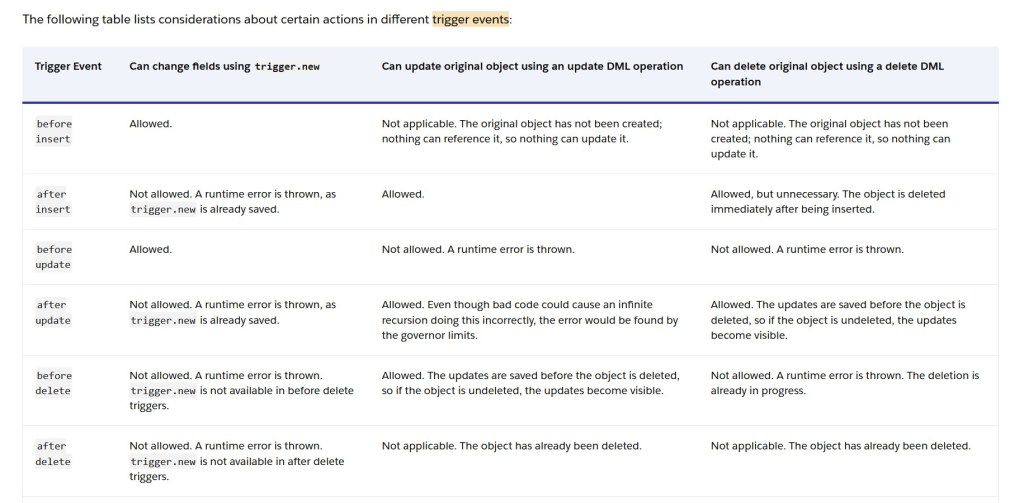
- You can write triggers to execute before the specified event occurs. They can also execute after the event occurs. Examples include before insert, after insert, before update, after update, before delete, or after delete.
- Salesforce provides the “Trigger.operationType” variable, which tells us about the current trigger event.
- Additionally, triggers provide various actions that you can perform. These include updating fields on other objects, sending notifications, and even calling external web services. Leveraging these capabilities, you can use triggers as a powerful tool to automate complex business processes in Salesforce.
Trigger Best Practices
- Try to have only one trigger per object. Having multiple triggers for the same object can result in conflicts and you cannot guarantee the order of execution.
- Use the design pattern like handler class pattern to separate trigger logic into smaller, focused classes, one for each event. This makes the code maintainable, testable and easy to understand.
- Avoid DML and SOQL operations in loops to conserve governor limits, use bulk DML operations outside of loops.
- Use the “Trigger.new” and “Trigger.newMap” variables instead of Trigger.new and Trigger.newMap whenever possible: Using these variables consumes less governor limits.
- Bulkify code by using collections and SOQL to query large numbers of records. Avoid using SOQL/DML inside loops, and use for loop with SOQL/SOSL to process records.
- Avoid Recursion by using static variables like set and maps to control the number of times the trigger is executed. Refer my blog How to Prevent Recursion in Apex Triggers In Salesforce: Best Practices Explained for more details.
Trigger Operation type and context variables availability
Before Insert:
- Trigger.new – A list of the new sObject records that are being inserted. This list contains the sObject records that will be inserted in the database.
After Insert:
- Trigger.new – A list of the new sObject records that were inserted into the database.
- Trigger.newMap – A map of the new sObject records, where the keys are the record IDs. This map is only available when the trigger is invoked after the records are in the database. At this point, they have unique IDs.
Before Update:
- Trigger.new – A list of the new sObject records that are being updated.
- Trigger.old – A list of the old sObject records that were updated.
- Trigger.oldMap – A map of the old sObject records, where the keys are the record IDs.
After Update:
- Trigger.new – A list of the new sObject records that were updated in the database.
- Trigger.newMap – A map of the new sObject records, where the keys are the record IDs.
- Trigger.old – A list of the old sObject records before they were updated in the database.
- Trigger.oldMap – A map of the old sObject records, where the keys are the record IDs.
Before Delete:
- Trigger.old – A list of the old sObject records that are being deleted.
- Trigger.oldMap – A map of the old sObject records, where the keys are the record IDs.
After Delete:
- Trigger.old – A list of the old sObject records that were deleted from the database.
- Trigger.oldMap – A map of the old sObject records, where the keys are the record IDs.
After Undelete:
- Trigger.new – A list of the new sObject records that were undeleted from the recycle bin.
- Trigger.newMap – A map of the new sObject records, where the keys are the record IDs.
For more helpful articles please visit – https://thesalesforcedev.in

 Welcome to The Salesforce Dev
Leave a reply to Salesforce Flows vs. Apex Triggers: Choosing the Right Automation – Welcome to The Salesforce Dev Cancel reply