

In today’s digital-first world, integrations are at the core of every enterprise application strategy. Salesforce, being the #1 CRM, offers a variety of APIs that allow developers to interact with the platform programmatically. Among them, the Composite API stands out as one of the most powerful. It enables multiple API calls in a single request. This saves time, reduces complexity, and improves performance.
In this blog, we’ll explore:
- What is Composite API in Salesforce?
- Types of Composite APIs
- Pros and Cons of using Composite API
- Real-world examples with practical use cases
The Composite API in Salesforce allows you to send multiple REST API requests in a single HTTP call. It treats them as a bundled operation instead of separate calls. This reduces server round trips and counts as only one API call against your limits.
What is Composite API in Salesforce?
Within a composite request, each individual call is known as a subrequest. Composite api has the ability to chain subrequests together. You can assign a reference ID to each subrequest. This allows you to pass its response, such as a record ID, into the URL or body of later subrequests. This is done using a JavaScript-like reference notation. This makes it possible to create dependent operations. For example, you can create an Account. Then, use its ID to create a related Contact in the same request.
Composite API supports:
- All sObject resources (
/sobjects/), including rows by external ID (but excluding Blob retrieval). - SOQL queries (
/query) and queryAll (/queryAll). - sObject Collections (
/composite/sobjects), available from API v43.0 onward.
Types of Composite APIs in Salesforce
Salesforce provides five main types of Composite APIs, each designed for specific scenarios:
- Composite API
- Composite Batch API
- Composite Graph API
- Composite (sObject) Tree API
- Composite (sObject) Collections API
Let’s each one of them in details –
1. 🔗 Composite API (Dependent Chained Requests)
Used for executing multiple REST API requests in a single call, while maintaining logical dependencies between them. The Composite API reduces the number of HTTP round trips. It allows related operations to be sent together in a single request. For example, you can create an Account and then a Contact for that Account in one request.
Key Highlights:
- Executes a series of REST API subrequests within a single composite request.
- Each subrequest runs in the context of the same user session and shares authentication.
- The response of one subrequest can be used as input in subsequent subrequests through reference IDs.
- Responses from all subrequests, including HTTP statuses, are returned together in a single composite response body.
- The entire composite call counts as one API call toward your limits.
- Each subrequest includes a referenceId, which uniquely identifies its response data.
- You can reference values (like IDs) from previous subrequests using JavaScript-like reference notation — for example:
"AccountId": "@{refAccount.id}". - Subrequests execute sequentially in the order they appear.
- Supports the allOrNone property to define transactional behavior:
- If set to
true, any subrequest failure rolls back the entire composite request. - If set to
false, only dependent subrequests are skipped, while independent ones continue.
- If set to
- Ideal for reducing the number of HTTP calls and improving integration efficiency.
- Limits:
- Maximum of 25 subrequests per composite request.
- Up to 5 subrequests can be query or sObject collection operations.
- All subrequests must execute in the context of the same user session.
- Best Used When:
- Performing multiple related operations that depend on one another (e.g., Create Account → Create Contact).
- You need to minimize API call count for efficiency and performance.
- Implementing lightweight transactional logic where rollback control is required.
- Handling chained, but not deeply nested, data dependencies.
SFDC Reference – Composite API Documentation
Example 1: Create Account → Create Contact
- Use Case: When a new customer registers, you want to create an Account first. Then, link a primary Contact to it.
- Flow:
- Request 1: Create an Account (
Test Account). - Request 2: Create a Contact (
Test Contact) using the Account ID from step 1.
- Request 1: Create an Account (
Sample Request –
End Point - POST /services/data/v60.0/composite
{
  "compositeRequest": [
    {
      "method": "POST",
      "url": "/services/data/v60.0/sobjects/Account",
      "referenceId": "newAccount",
      "body": {
        "Name": "Test Account"
      }
    },
    {
      "method": "POST",
      "url": "/services/data/v60.0/sobjects/Contact",
      "referenceId": "newContact",
      "body": {
        "FirstName": "Test",
        "LastName": "Contact",
        "Email": "test@test.com",
        "AccountId": "@{newAccount.id}"
      }
    }
  ]
}
Sample Response –
{
  "compositeResponse": [
    {
      "body": {
        "id": "001J200000K6WNfIAN",
        "success": true,
        "errors": []
      },
      "httpHeaders": {
        "Location": "/services/data/v60.0/sobjects/Account/001J200000K6WNfIAN"
      },
      "httpStatusCode": 201,
      "referenceId": "newAccount"
    },
    {
      "body": {
        "id": "003J200000IhkCnIAJ",
        "success": true,
        "errors": []
      },
      "httpHeaders": {
        "Location": "/services/data/v60.0/sobjects/Contact/003J200000IhkCnIAJ"
      },
      "httpStatusCode": 201,
      "referenceId": "newContact"
    }
  ]
}

👉 Benefit: No need for multiple calls from the client; dependencies are handled within Salesforce.
Example 2: Create Opportunity → Create Task
- Use Case: When Sales Rep closes an lead, automatically create an Opportunity and assign a follow-up Task.
- Flow:
- Request 1: Create Opportunity (
Big Deal - Q4). - Request 2: Create Task (
Follow up call) referencing the Opportunity ID.
- Request 1: Create Opportunity (
Sample Request –
End Point - POST /services/data/v60.0/composite
{
  "compositeRequest": [
    {
      "method": "POST",
      "url": "/services/data/v60.0/sobjects/Opportunity",
      "referenceId": "newOpp",
      "body": {
        "Name": "Big Deal - Q4",
        "StageName": "Prospecting",
        "CloseDate": "2025-12-31"
      }
    },
    {
      "method": "POST",
      "url": "/services/data/v60.0/sobjects/Task",
      "referenceId": "newTask",
      "body": {
        "Subject": "Follow up call",
        "WhatId": "@{newOpp.id}",
        "Status": "Not Started"
      }
    }
  ]
}
Sample Response –
{
  "compositeResponse": [
    {
      "body": {
        "id": "006J2000004xSGNIA2",
        "success": true,
        "errors": []
      },
      "httpHeaders": {
        "Location": "/services/data/v60.0/sobjects/Opportunity/006J2000004xSGNIA2"
      },
      "httpStatusCode": 201,
      "referenceId": "newOpp"
    },
    {
      "body": {
        "id": "00TJ200000iXjVQMA0",
        "success": true,
        "errors": []
      },
      "httpHeaders": {
        "Location": "/services/data/v60.0/sobjects/Task/00TJ200000iXjVQMA0"
      },
      "httpStatusCode": 201,
      "referenceId": "newTask"
    }
  ]
}

👉 Benefit: Reduces time and ensures Task is tied to the right Opportunity instantly.
Example 3: Create Account → Contact (rollback if Contact fails), Using allOrNone Property
- Use Case: When Sales closes a lead, automatically create an Opportunity and assign a follow-up Task.
- Flow:
- Request 1: Create an Account (
Transaction Test Corp). - Request 2: Create a Contact with a missing required field, referencing the Account ID from step 1.
- Request 1: Create an Account (
Sample Request –
End Point - POST /services/data/v60.0/composite
{
  "allOrNone": true,
  "compositeRequest": [
    {
      "method": "POST",
      "url": "/services/data/v60.0/sobjects/Account",
      "referenceId": "newAcc",
      "body": {
        "Name": "Transaction Test Corp"
      }
    },
    {
      "method": "POST",
      "url": "/services/data/v60.0/sobjects/Contact",
      "referenceId": "newCon",
      "body": {
        "LastName": "",
        "AccountId": "@{newAcc.id}"
      }
    }
  ]
}
👉 With "allOrNone": true: If the Contact fails, the Account will also not be created.
Sample Response –
{
  "compositeResponse": [
    {
      "body": [
        {
          "errorCode": "PROCESSING_HALTED",
          "message": "The transaction was rolled back since another operation in the same transaction failed."
        }
      ],
      "httpHeaders": {},
      "httpStatusCode": 400,
      "referenceId": "newAcc"
    },
    {
      "body": [
        {
          "message": "Required fields are missing: [LastName]",
          "errorCode": "REQUIRED_FIELD_MISSING",
          "fields": [
            "LastName"
          ]
        }
      ],
      "httpHeaders": {},
      "httpStatusCode": 400,
      "referenceId": "newCon"
    }
  ]
}
👉 Benefit: Ensures all-or-nothing behavior — preventing orphan Accounts without Contacts and keeping the CRM data clean and reliable.
Example 4: Query Account → Create Contact → Update → Upsert → Delete
Use Case
When a user submits a form, you want to:
- Find the Account by name (instead of creating a new one).
- Create a new Contact linked to that Account.
- Update the Account’s details.
- Upsert the Account using an External ID (create if not found).
- Delete an existing Contact record.
Flow
- Request 1: Query Account by Name (
Test Account) using SOQL. - Request 2: Create a Contact linked to the Account from step 1.
- Request 3: Update the Account’s Phone and Billing City.
- Request 4: Upsert Account using
ExternalId__c = EXT-123. - Request 5: Delete a specific Contact by its Salesforce ID.
Sample Request –
End Point - POST /services/data/v60.0/composite
{
  "allOrNone": true,
  "compositeRequest": [
    {
      "method": "GET",
      "url": "/services/data/v60.0/query/?q=SELECT+Id,+Name,+Phone+FROM+Account+WHERE+Name='Test+Account'+LIMIT+1",
      "referenceId": "getAccountByName"
    },
    {
      "method": "POST",
      "url": "/services/data/v60.0/sobjects/Contact",
      "referenceId": "createContact",
      "body": {
        "FirstName": "John123",
        "LastName": "Doe123",
        "Email": "john1.doe2@example.com",
        "AccountId": "@{getAccountByName.records[0].Id}"
      }
    },
    {
      "method": "PATCH",
      "url": "/services/data/v60.0/sobjects/Account/@{getAccountByName.records[0].Id}",
      "referenceId": "updateAccount",
      "body": {
        "Phone": "9998887777",
        "BillingCity": "Los Angeles"
      }
    },
    {
      "method": "PATCH",
      "url": "/services/data/v60.0/sobjects/Account/ExternalId__c/EXT-123",
      "referenceId": "upsertUsingExternalId",
      "body": {
        "Phone": "123456789"
      }
    },
    {
      "method": "DELETE",
      "url": "/services/data/v60.0/sobjects/Contact/003J200000Ii6Yh",
      "referenceId": "deleteContact"
    }
  ]
}
Sample Response –
{
  "compositeResponse": [
    {
      "body": {
        "totalSize": 1,
        "done": true,
        "records": [
          {
            "attributes": {
              "type": "Account",
              "url": "/services/data/v60.0/sobjects/Account/001J200000K6WNfIAN"
            },
            "Id": "001J200000K6WNfIAN",
            "Name": "Test Account",
            "Phone": null
          }
        ]
      },
      "httpHeaders": {},
      "httpStatusCode": 200,
      "referenceId": "getAccountByName"
    },
    {
      "body": {
        "id": "003J200000Ii6MFIAZ",
        "success": true,
        "errors": []
      },
      "httpHeaders": {
        "Location": "/services/data/v60.0/sobjects/Contact/003J200000Ii6MFIAZ"
      },
      "httpStatusCode": 201,
      "referenceId": "createContact1"
    },
    {
      "body": null,
      "httpHeaders": {},
      "httpStatusCode": 204,
      "referenceId": "updateAccount"
    },
    {
      "body": {
        "id": "001J200000K6b29IAB",
        "success": true,
        "errors": [],
        "created": false
      },
      "httpHeaders": {
        "Location": "/services/data/v60.0/sobjects/Account/001J200000K6b29IAB"
      },
      "httpStatusCode": 200,
      "referenceId": "upsertCustomObject_ExternalId"
    },
    {
      "body": null,
      "httpHeaders": {},
      "httpStatusCode": 204,
      "referenceId": "deleteContact"
    }
  ]
}
2. ⚡ Composite Batch API (Independent Sub Requests)
Used for executing multiple independent REST API requests in a single HTTP call. The Batch API improves efficiency. It groups up to 25 requests together. Each request is handled as a separate, self-contained operation.
Key Highlights:
- Executes up to 25 subrequests in one batch call.
- Each subrequest is independent — data from one request cannot be referenced by another.
- Subrequests are executed sequentially in the order they appear in the request body.
- The entire batch request counts as one API call, but each subrequest counts individually toward API rate limits.
- The response body includes results and HTTP statuses for all subrequests in a single combined response.
- All subrequests execute under the same authenticated user session.
- Commits from successful subrequests are not rolled back if a later subrequest fails.
- Uses
haltOnErrorinstead ofallOrNone:- When
"haltOnError": true→ the batch stops executing at the first failure. - When
"haltOnError": false(default) → the batch continues executing remaining subrequests even if some fail.
- When
- Each successful subrequest commits its changes immediately.
- If the batch request takes longer than 10 minutes, it times out and the remaining subrequests are not processed.
- Supported Resources:
- Supports most REST API resources, including:
- sObjects (except Blob and Rich Text Image fields)
- Query, QueryAll, SOSL
- Connect, Chatter, and Actions APIs
- Supports most REST API resources, including:
- Limits:
- Maximum of 25 subrequests per batch request.
- Timeout limit: 10 minutes per batch.
- Each subrequest counts toward daily API limits individually.
- Best Used When:
- Performing multiple unrelated operations in a single call for efficiency.
- You don’t need to pass data between subrequests.
- Use cases where partial success is acceptable — meaning some requests can succeed even if others fail.
- Scenarios that involve mixed request types like SOQL queries, record inserts, and chatter posts together.
SFDC Reference – Composite Batch API Documentation
Example 1: Fetch Multiple Accounts at Once
- Use Case: A dashboard needs to display details of multiple Accounts in one screen.
- Flow:
- Multiple GET requests for Accounts sent in one batch.
- Add fields param in subrequest, if you need to fetch particular fields, else it will fetch all fields.
- Result: All Accounts are fetched in parallel, saving client-side calls.
Sample Request –
End Point - POST /services/data/v60.0/composite/batch
{
  "batchRequests": [
    {
      "method": "GET",
      "url": "/services/data/v60.0/sobjects/Account/001J200000K6WNf"
    },
    {
      "method": "GET",
      "url": "/services/data/v60.0/sobjects/Account/0015h00001WVJm3?fields=Name,Rating"
    }
  ]
}
Sample Response –
{
  "hasErrors": false,
  "results": [
    {
      "statusCode": 200,
      "result": {
        "attributes": {
          "type": "Account",
          "url": "/services/data/v60.0/sobjects/Account/001J200000K6WNfIAN"
        },
        "Id": "001J200000K6WNfIAN",
        "IsDeleted": false,
        "MasterRecordId": null,
        "Name": "Test Account",
        "Type": null,
        "ParentId": null,
        "BillingStreet": null,
        "BillingCity": null,
        "BillingState": null,
        "BillingPostalCode": null,
        "BillingCountry": null,
        "BillingLatitude": null,
        "BillingLongitude": null,
        "BillingGeocodeAccuracy": null,
        "BillingAddress": null,
        "ShippingStreet": null,
        "ShippingCity": null,
        "ShippingState": null,
        "ShippingPostalCode": null,
        "ShippingCountry": null,
        "ShippingLatitude": null,
        "ShippingLongitude": null,
        "ShippingGeocodeAccuracy": null,
        "ShippingAddress": null,
        "Phone": null,
        "Fax": null,
        "AccountNumber": null,
        "Website": null,
        "PhotoUrl": "/services/images/photo/001J200000K6WNfIAN",
        "Sic": null,
        "Industry": null,
        "AnnualRevenue": null,
        "NumberOfEmployees": null,
        "Ownership": null,
        "TickerSymbol": null,
        "Description": null,
        "Rating": "Cold",
        "Site": null,
        "OwnerId": "0055h00000AVRYwAAP",
        "CreatedDate": "2025-10-26T14:43:51.000+0000",
        "CreatedById": "0055h00000AVRYwAAP",
        "LastModifiedDate": "2025-10-26T14:43:51.000+0000",
        "LastModifiedById": "0055h00000AVRYwAAP",
        "SystemModstamp": "2025-10-26T14:43:51.000+0000",
        "LastActivityDate": null,
        "LastViewedDate": "2025-10-26T14:54:33.000+0000",
        "LastReferencedDate": "2025-10-26T14:54:33.000+0000",
        "IsPartner": false,
        "IsCustomerPortal": false,
        "ChannelProgramName": null,
        "ChannelProgramLevelName": null,
        "Jigsaw": null,
        "JigsawCompanyId": null,
        "CleanStatus": "Pending",
        "AccountSource": null,
        "DunsNumber": null,
        "Tradestyle": null,
        "NaicsCode": null,
        "NaicsDesc": null,
        "YearStarted": null,
        "SicDesc": null,
        "DandbCompanyId": null,
        "OperatingHoursId": null,
        "CustomerPriority__c": null,
        "SLA__c": null,
        "Active__c": null,
        "NumberofLocations__c": null,
        "UpsellOpportunity__c": null,
        "SLASerialNumber__c": null,
        "SLAExpirationDate__c": null,
        "Customer_Email__c": null,
        "Parent_Picklist__c": null,
        "Child_Picklist__c": null,
        "Total_Number_Of_Contacts__c": 1,
        "Partner_Type__c": null,
        "test__c": null
      }
    },
    {
      "statusCode": 200,
      "result": {
        "attributes": {
          "type": "Account",
          "url": "/services/data/v60.0/sobjects/Account/0015h00001WVJm3AAH"
        },
        "Name": "Burlington Textiles Corp of America",
        "Rating": "Warm",
        "Id": "0015h00001WVJm3AAH"
      }
    }
  ]
}
Example 2: Update Multiple Records in One Call
- Use Case: Marketing team wants to update multiple fields on multiple Contacts.
- Flow:
- Multiple PATCH requests for different Contact IDs.
- Result: All Contacts updated in one batch, independent of each other.
Sample Request –
End Point - POST /services/data/v60.0/composite/batch
{
  "batchRequests": [
    {
      "method": "PATCH",
      "url": "/services/data/v60.0/sobjects/Contact/0035h00001Hl1Tn",
      "richInput": {
        "LastName": "Rogers2"
      }
    },
    {
      "method": "PATCH",
      "url": "/services/data/v60.0/sobjects/Contact/003J200000IhkCn",
      "richInput": {
        "Email": "newemail1@example.com"
      }
    }
  ]
}
Sample Response –
{
  "hasErrors": false,
  "results": [
    {
      "statusCode": 204,
      "result": null
    },
    {
      "statusCode": 204,
      "result": null
    }
  ]
}
👉 Note: If one Contact update fails, the others still succeed.
Example 3: Updating Multiple Contacts, Using haltOnError Property
Sample Request –
End Point - POST /services/data/v60.0/composite/batch
{
  "haltOnError": true,
  "batchRequests": [
    {
      "method": "PATCH",
      "url": "/services/data/v60.0/sobjects/Contact/0035h00001Hl1T1n",
      "richInput": {
        "LastName": "Rogers2"
      }
    },
    {
      "method": "PATCH",
      "url": "/services/data/v60.0/sobjects/Contact/003J200000IhkCn",
      "richInput": {
        "Email": "newemail1@example1.com"
      }
    }
  ]
}
👉 With "haltOnError": true: If the First Contact Update fails, the Remaining batch Contact update will also fails.
Sample Response –
{
  "hasErrors": true,
  "results": [
    {
      "result": [
        {
          "errorCode": "NOT_FOUND",
          "message": "Provided external ID field does not exist or is not accessible: 0035h00001Hl1T1n"
        }
      ],
      "statusCode": 404
    },
    {
      "result": [
        {
          "errorCode": "BATCH_PROCESSING_HALTED",
          "message": "Batch processing halted per request"
        }
      ],
      "statusCode": 412
    }
  ]
}
3. 🕸 Composite Graph API (Complex Dependencies)
Used for executing complex, interdependent operations in a single API call where multiple requests rely on each other’s results. Composite Graph API extends the regular Composite API. It lets you define a graph of related operations. This ensures precise execution order and guarantees transactional integrity.
- Designed for advanced, transaction-style operations with multiple dependencies between requests.
- Enables building graphs of interdependent subrequests where outputs from one can be used as inputs for another.
- Executes a series of REST API requests in one call, ensuring atomic behavior across each graph.
- Each graph in the request is treated as a separate transactional unit. It either completes fully or rolls back entirely.
- Extends the regular Composite API limit of 25 subrequests to 500 nodes per graph. This extension allows much larger and more complex operations.
- Each graph is identified using a unique
graphId, which:- Must begin with an alphanumeric character.
- Must be less than 40 characters long.
- Must not contain a period (
.). - Must be unique within the composite graph operation.
- The
allOrNonebehavior is implicit — meaning each graph is automatically rolled back if any subrequest fails. - Subrequests within one graph cannot reference subrequests from another graph, ensuring each graph’s independence.
- If one graph fails, other graphs in the same request can still be processed successfully.
- The API response clearly identifies each graph’s result and its corresponding
graphId.
Best Practices:
- Keep graphs as small as possible for better performance and easier debugging.
- Example: 50 graphs with 10 nodes each perform better than 1 large graph with 500 nodes.
- Smaller graphs allow faster parallel processing and make it easier to isolate failures.
- Use composite graphs when you have multi-step operations. These operations must follow a specific order. They may also depend on results of previous steps.
Limits:
- Maximum graphs per payload: 75
- Maximum nodes per graph: 500
- Maximum graph depth: 15
- Maximum unique node definitions per payload: 15
- Maximum graph failures before halting: 14
- Maximum nodes per payload (overall): 500
Best Used When:
- Complex, dependency-based integrations.
- When you need precision, order, and guaranteed data consistency.
SFDC Reference –
Example 1: Using Single Graph – Create Account → Add Contacts → Add Opportunities
- Use Case: A new enterprise customer signs up, requiring multiple linked objects.
- Flow:
- Node 1: Create Account (
Tech Innovations). - Node 2: Create Contacts (
CEO,CFO) linked to Account. - Node 3: Create Opportunity (
Annual Deal) linked to Account.
- Node 1: Create Account (
- Result: Executed as a graph with dependencies; if Account creation fails, all downstream nodes fail.
Sample Request –
End Point - POST /services/data/v60.0/composite/graph
{
  "graphs": [
    {
      "graphId": "Graph1",
      "compositeRequest": [
        {
          "method": "POST",
          "url": "/services/data/v60.0/sobjects/Account",
          "referenceId": "acc1",
          "body": {
            "Name": "Tech Innovations"
          }
        },
        {
          "method": "POST",
          "url": "/services/data/v60.0/sobjects/Contact",
          "referenceId": "con1",
          "body": {
            "LastName": "CEO User",
            "AccountId": "@{acc1.id}"
          }
        },
        {
          "method": "POST",
          "url": "/services/data/v60.0/sobjects/Contact",
          "referenceId": "con2",
          "body": {
            "LastName": "CFO User",
            "AccountId": "@{acc1.id}"
          }
        },
        {
          "method": "POST",
          "url": "/services/data/v60.0/sobjects/Opportunity",
          "referenceId": "opp1",
          "body": {
            "Name": "Annual Deal",
            "Amount": 50000,
            "StageName": "Qualification",
            "CloseDate": "2025-12-15",
            "AccountId": "@{acc1.id}"
          }
        }
      ]
    }
  ]
}
Sample Response –
{
  "graphs": [
    {
      "graphId": "Graph1",
      "graphResponse": {
        "compositeResponse": [
          {
            "body": {
              "id": "001J200000K6WP7IAN",
              "success": true,
              "errors": []
            },
            "httpHeaders": {
              "Location": "/services/data/v60.0/sobjects/Account/001J200000K6WP7IAN"
            },
            "httpStatusCode": 201,
            "referenceId": "acc1"
          },
          {
            "body": {
              "id": "003J200000IhkEZIAZ",
              "success": true,
              "errors": []
            },
            "httpHeaders": {
              "Location": "/services/data/v60.0/sobjects/Contact/003J200000IhkEZIAZ"
            },
            "httpStatusCode": 201,
            "referenceId": "con1"
          },
          {
            "body": {
              "id": "003J200000IhkEaIAJ",
              "success": true,
              "errors": []
            },
            "httpHeaders": {
              "Location": "/services/data/v60.0/sobjects/Contact/003J200000IhkEaIAJ"
            },
            "httpStatusCode": 201,
            "referenceId": "con2"
          },
          {
            "body": {
              "id": "006J2000004xSGmIAM",
              "success": true,
              "errors": []
            },
            "httpHeaders": {
              "Location": "/services/data/v60.0/sobjects/Opportunity/006J2000004xSGmIAM"
            },
            "httpStatusCode": 201,
            "referenceId": "opp1"
          }
        ]
      },
      "isSuccessful": true
    }
  ]
}

Example 2: Using Single Graph – Create Case → Add Task → Add Case Comments
- Use Case: In a Service Cloud integration, create a Case and related objects in one go.
- Flow:
- Node 1: Create Case (
High Priority Support Request). - Node 2: Create Task (
Call Customer). - Node 3: Create CaseComment (
Logged initial complaint).
- Node 1: Create Case (
- Result: All tied together as a transaction with defined execution order.
Sample Request –
End Point - POST /services/data/v60.0/composite/graph
{
  "graphs": [
    {
      "graphId": "CaseGraph",
      "compositeRequest": [
        {
          "method": "POST",
          "url": "/services/data/v60.0/sobjects/Case",
          "referenceId": "case1",
          "body": {
            "Subject": "High Priority Support Request",
            "Origin": "Web",
            "Status": "New"
          }
        },
        {
          "method": "POST",
          "url": "/services/data/v60.0/sobjects/Task",
          "referenceId": "task1",
          "body": {
            "Subject": "Call Customer",
            "WhatId": "@{case1.id}",
            "Status": "Not Started"
          }
        },
        {
          "method": "POST",
          "url": "/services/data/v60.0/sobjects/CaseComment",
          "referenceId": "comment1",
          "body": {
            "ParentId": "@{case1.id}",
            "CommentBody": "Logged initial complaint."
          }
        }
      ]
    }
  ]
}
Sample Response –
{
  "graphs": [
    {
      "graphId": "CaseGraph",
      "graphResponse": {
        "compositeResponse": [
          {
            "body": {
              "id": "500J200000IpQm7IAF",
              "success": true,
              "errors": []
            },
            "httpHeaders": {
              "Location": "/services/data/v60.0/sobjects/Case/500J200000IpQm7IAF"
            },
            "httpStatusCode": 201,
            "referenceId": "case1"
          },
          {
            "body": {
              "id": "00TJ200000iXyAsMAK",
              "success": true,
              "errors": []
            },
            "httpHeaders": {
              "Location": "/services/data/v60.0/sobjects/Task/00TJ200000iXyAsMAK"
            },
            "httpStatusCode": 201,
            "referenceId": "task1"
          },
          {
            "body": {
              "id": "00aJ2000002DxCCIA0",
              "success": true,
              "errors": []
            },
            "httpHeaders": {
              "Location": "/services/data/v60.0/sobjects/CaseComment/00aJ2000002DxCCIA0"
            },
            "httpStatusCode": 201,
            "referenceId": "comment1"
          }
        ]
      },
      "isSuccessful": true
    }
  ]
}

Example 3: Using Multiple Graph – Create Multiple Accounts with Related Records
- Use Case: A Salesforce team wants to onboard two new business clients. The team plans to automatically create their primary contacts. They also want to create opportunities in a single API request using the Composite Graph API.
- Flow:
- Graph 1:
- Node 1: Create Account → Cloudy Consulting
- Node 2: Create Contact → Nellie Cashman (linked to Cloudy Consulting)
- Node 3: Create Opportunity → Opportunity 1 (linked to Cloudy Consulting)
- Graph 2:
- Node 1: Create Account → Easy Spaces
- Node 2: Create Contact → Charlie Dawson (linked to Easy Spaces)
- Graph 1:
- Result: Two separate graphs are executed in a single composite request:
- Each graph maintains its own dependency chain. For instance, if Account creation fails in Graph 1, the related Contact and Opportunity will not be created.
- The graphs execute independently, so even if Graph 1 fails, Graph 2 can still succeed.
Sample Request –
End Point - POST /services/data/v65.0/composite/graph
{
    "graphs" : [
        {
            "graphId" : "1",
            "compositeRequest" : [
                {
                    "url" : "/services/data/v65.0/sobjects/Account/",
                    "body" : {
                        "name" : "Cloudy Consulting"
                    },
                    "method" : "POST",
                    "referenceId" : "reference_id_account_1"
                },
                {
                    "url" : "/services/data/v65.0/sobjects/Contact/",
                    "body" : {
                        "FirstName" : "Nellie",
                        "LastName" : "Cashman",
                        "AccountId" : "@{reference_id_account_1.id}"
                    },
                    "method" : "POST",
                    "referenceId" : "reference_id_contact_1"
                },
                {
                    "url" : "/services/data/v65.0/sobjects/Opportunity/",
                    "body" : {
                        "CloseDate" : "2024-05-22",
                        "StageName" : "Prospecting",
                        "Name" : "Opportunity 1",
                        "AccountId" : "@{reference_id_account_1.id}"
                    },
                    "method" : "POST",
                    "referenceId" : "reference_id_opportunity_1"
                }
            ]
        },
        {
            "graphId" : "2",
            "compositeRequest" : [
                {
                    "url" : "/services/data/v65.0/sobjects/Account/",
                    "body" : {
                        "name" : "Easy Spaces"
                    },
                    "method" : "POST",
                    "referenceId" : "reference_id_account_2"
                },
                {
                    "url" : "/services/data/v65.0/sobjects/Contact/",
                    "body" : {
                        "FirstName" : "Charlie",
                        "LastName" : "Dawson",
                        "AccountId" : "@{reference_id_account_2.id}"
                    },
                    "method" : "POST",
                    "referenceId" : "reference_id_contact_2"
                }
            ]
        }
    ]
}
Sample Response –
{
  "graphs": [
    {
      "graphId": "1",
      "graphResponse": {
        "compositeResponse": [
          {
            "body": {
              "id": "001J200000K6ek0IAB",
              "success": true,
              "errors": []
            },
            "httpHeaders": {
              "Location": "/services/data/v65.0/sobjects/Account/001J200000K6ek0IAB"
            },
            "httpStatusCode": 201,
            "referenceId": "reference_id_account_1"
          },
          {
            "body": {
              "id": "003J200000IhtFXIAZ",
              "success": true,
              "errors": []
            },
            "httpHeaders": {
              "Location": "/services/data/v65.0/sobjects/Contact/003J200000IhtFXIAZ"
            },
            "httpStatusCode": 201,
            "referenceId": "reference_id_contact_1"
          },
          {
            "body": {
              "id": "006J2000004xSI4IAM",
              "success": true,
              "errors": []
            },
            "httpHeaders": {
              "Location": "/services/data/v65.0/sobjects/Opportunity/006J2000004xSI4IAM"
            },
            "httpStatusCode": 201,
            "referenceId": "reference_id_opportunity_1"
          }
        ]
      },
      "isSuccessful": true
    },
    {
      "graphId": "2",
      "graphResponse": {
        "compositeResponse": [
          {
            "body": {
              "id": "001J200000K6ek1IAB",
              "success": true,
              "errors": []
            },
            "httpHeaders": {
              "Location": "/services/data/v65.0/sobjects/Account/001J200000K6ek1IAB"
            },
            "httpStatusCode": 201,
            "referenceId": "reference_id_account_2"
          },
          {
            "body": {
              "id": "003J200000IhtFYIAZ",
              "success": true,
              "errors": []
            },
            "httpHeaders": {
              "Location": "/services/data/v65.0/sobjects/Contact/003J200000IhtFYIAZ"
            },
            "httpStatusCode": 201,
            "referenceId": "reference_id_contact_2"
          }
        ]
      },
      "isSuccessful": true
    }
  ]
}


👉 Benefit: Using a Composite Graph (vs Regular Composite Request)
- ✅ Single API Call Efficiency: Executes multiple REST API requests in one call. It is just like regular composite but offers greater flexibility.
- 🔁 Data Dependency Chaining: One request’s output can be reused as another’s input. Both support this. However, graphs handle deeper, multi-level dependencies.
- 🧩 Complex Relationships: Regular composite handles simple object relationships, while composite graphs manage nested, interrelated records more effectively.
- ⚙️ Transactional Integrity: Ensures all-or-nothing behavior — if one operation fails, the entire graph rolls back, preventing partial data creation.
- 📈 Scalability: Regular composite is limited to 25 subrequests, whereas composite graphs support up to 500 subrequests per call.
4. 🌳 Composite (sObject) Tree API (Parent–Child)
Used specifically for creating or updating hierarchical (parent-child) records in a single API request. The sObject Tree API allows insertion of multiple related records. This includes Accounts with Contacts or Opportunities. It ensures full atomicity — meaning all records succeed or all fail.
- Designed to create or update nested, hierarchical record structures in a single transaction.
- Ideal for inserting or updating records with lookup or master-detail relationships.
- Creates one or more sObject trees, each with a single root record type.
- An sObject tree represents a structured set of parent-child records linked together by relationships.
- The request body defines the hierarchy, object types, field values, and reference IDs for each record.
- Records are processed sequentially in the order they appear in the request.
- All operations are atomic — if any record fails, the entire tree fails and no records are committed.
- On success, the response includes the Salesforce IDs of all created records.
- On failure, the response returns the reference ID and error details for the record that caused the issue.
- The entire tree operation counts as one API call toward daily limits.
- Supports creating multiple trees in a single request.
- Can also create unrelated records of the same type (up to 200 records) if no hierarchy is defined.
Limits:
- Maximum 200 records total per request (including all trees).
- Up to 5 different record types allowed in one request.
- Maximum tree depth of 5 levels (root + 4 child levels).
- Triggers, flows, and workflow rules execute separately for each record level:
- Root records (level 1)
- Second-level child records (level 2)
- Third-level, fourth-level, and fifth-level records respectively
Best Used When:
- Creating or updating hierarchical, dependent records such as Account → Contact → Opportunity.
- You need transactional consistency — ensuring either all related records are inserted or none at all.
- Building parent-child record structures with defined ownership or relationships.
- Bulk-inserting nested records while maintaining referential integrity.
SFDC Reference – Composite (sObject) Tree Api Documentation
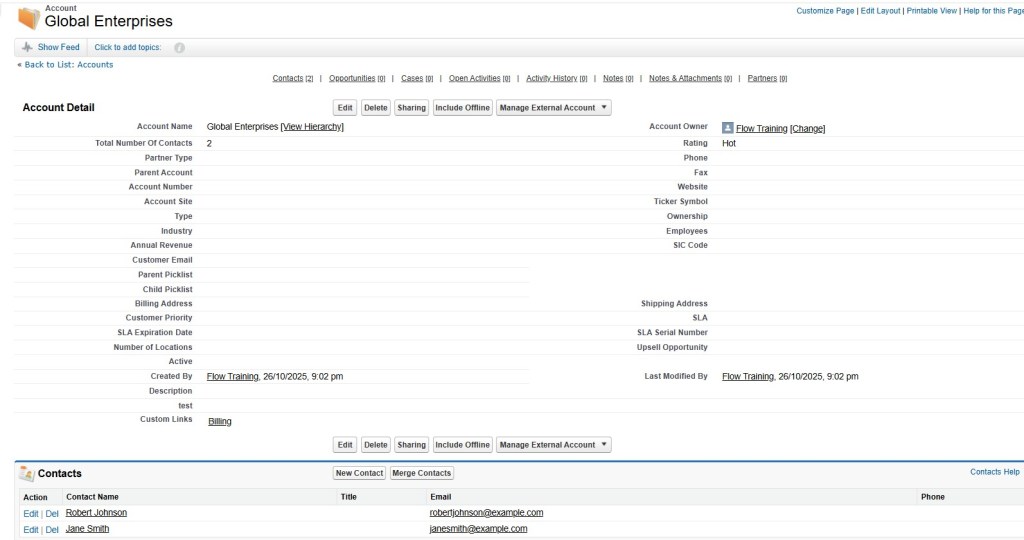
Example 1: Create Account → With Related Contacts
- Use Case: On customer onboarding, create an Account along with multiple Contacts.
- Flow:
- Account (
Global Enterprises). - Contacts (
Jane Smith,Robert Johnson) linked in the same tree.
- Account (
- Result: Entire hierarchy created atomically — if one Contact fails, all roll back.
Sample Request –
End Point - POST /services/data/v60.0/composite/tree/Account
{
  "records": [
    {
      "attributes": {
        "type": "Account",
        "referenceId": "ref1"
      },
      "Name": "Global Enterprises",
      "Contacts": {
        "records": [
          {
            "attributes": {
              "type": "Contact",
              "referenceId": "ref2"
            },
            "FirstName": "Jane",
            "LastName": "Smith",
            "Email": "janesmith@example.com"
          },
          {
            "attributes": {
              "type": "Contact",
              "referenceId": "ref3"
            },
            "FirstName": "Robert",
            "LastName": "Johnson",
            "Email": "robertjohnson@example.com"
          }
        ]
      }
    }
  ]
}
Sample Response –
{
  "hasErrors": false,
  "results": [
    {
      "referenceId": "ref1",
      "id": "001J200000K6WOYIA3"
    },
    {
      "referenceId": "ref2",
      "id": "003J200000IhkDqIAJ"
    },
    {
      "referenceId": "ref3",
      "id": "003J200000IhkDrIAJ"
    }
  ]
}
Example 2: Create Account → With Related Opportunity → With Related Opportunity Products
- Use Case: A Sales rep enters a new customer with new deal with multiple product line items.
- Flow:
- Account (Test Acc)
- Opportunity (
Software Subscription - 2025). - OpportunityLineItems (
Product A,Product B,Product C).
- Result: Opportunity and all products are inserted in a single transaction.
End Point - POST /services/data/v60.0/composite/tree/Opportunity
Sample Request –
{
  "records": [
    {
      "attributes": {
        "type": "Account",
        "referenceId": "accRef"
      },
      "Name": "TestAcc",
      "Opportunities": {
        "records": [
          {
            "attributes": {
              "type": "Opportunity",
              "referenceId": "oppRef"
            },
            "Name": "Software Subscription - 2025",
            "StageName": "Qualification",
            "CloseDate": "2025-11-30",
            "OpportunityLineItems": {
              "records": [
                {
                  "attributes": {
                    "type": "OpportunityLineItem",
                    "referenceId": "oli1"
                  },
                  "Quantity": 1,
                  "PricebookEntryId": "01u5h000006Yv7q",
                  "UnitPrice": 5000
                },
                {
                  "attributes": {
                    "type": "OpportunityLineItem",
                    "referenceId": "oli2"
                  },
                  "Quantity": 2,
                  "PricebookEntryId": "01u5h000006Yv7i",
                  "UnitPrice": 2500
                }
              ]
            }
          }
        ]
      }
    }
  ]
}
Sample Response –
{
  "hasErrors": false,
  "results": [
    {
      "referenceId": "accRef",
      "id": "001J200000K6b29IAB"
    },
    {
      "referenceId": "oppRef",
      "id": "006J2000004xSHQIA2"
    },
    {
      "referenceId": "oli1",
      "id": "00kJ2000003XTfgIAG"
    },
    {
      "referenceId": "oli2",
      "id": "00kJ2000003XTfhIAG"
    }
  ]
}


5. 🌾 Composite (sObject) Collections API (Actions on same object type)
Used for performing create, read, update, upsert, or delete actions on multiple records in a single request. Designed to reduce round-trips between the client and server by grouping operations together. The entire request counts as one API call toward your limits, even when it includes multiple record actions. Available in API version 42.0 and later.
Key Highlights:
- Executes bulk operations on up to 200 records in one call.
- Supports multiple HTTP methods:
POST→ Create or retrieve records.PATCH→ Update or upsert records.DELETE→ Delete records.GET→ Retrieve one or more records by ID.
- Each object must include an
attributesmap with a type value. - Records are processed in the order they appear in the request.
- You can optionally roll back the entire request if any record fails.
- The response contains individual
SaveResult,UpsertResult, orDeleteResultobjects corresponding to each record.
Supported Operations:
- Create Records (POST)
- Add up to 200 records (same or different object types).
- Returns a list of
SaveResultobjects. - Objects are created sequentially in the order listed.
- Can be rolled back entirely if an error occurs.
- If multiple object types are mixed, Salesforce processes them in chunks (up to 10 chunks per call).
- Retrieve Records (GET)
- Retrieve multiple records of the same object type in one call.
- Can retrieve up to ~800 records via URL or 2,000 records via request body.
- Returns an array of sObjects matching the IDs specified.
- Invalid IDs or inaccessible records return
nullfor that entry.
- Update Records (PATCH)
- Update up to 200 records (same or different object types).
- Each record must include a valid
Id. - Returns a list of
SaveResultobjects in the same order as the request. - Optional rollback on error.
- Upsert Records (PATCH)
- Create or update up to 200 records based on external ID fields.
- Each record must include the external ID field and
type. - Returns a list of
UpsertResultobjects. - Supported in API version 46.0 and later.
- Only external IDs are allowed — not standard record IDs.
- Delete Records (DELETE)
- Delete up to 200 records of the same object type.
- Returns
DeleteResultobjects in the same order as the IDs listed. - Optional rollback on error.
Limits and Considerations:
- Maximum of 200 records per request.
- Up to 10 chunks per request when multiple object types are mixed.
- You can’t include objects related to Salesforce Setup area features in mixed requests.
- Triggers, workflows, and automation fire for each record individually.
- Blob data requires additional attribute values and can’t be used in standard composite requests.
Best Used When:
- You need to perform bulk CRUD operations efficiently.
- You want to minimize API call usage and network latency.
- You need partial success control (deciding whether to continue or roll back).
- You’re handling records of the same object type or small sets of mixed objects not requiring hierarchical relationships.
SFDC Reference – Composite (sObject) Collections Api Documentation
Pros of Using Composite API
✅ Reduced API Calls: Bundle multiple operations into a single request.
✅ Improved Performance: Fewer round-trips between client and server.
✅ Transactional Safety: Certain composite APIs (Tree/Graph) support atomic transactions.
✅ Simpler Code: Reduces boilerplate and error-handling logic.
Cons of Using Composite API
❌ Complex Debugging: If something fails in a large request, tracing the exact issue may be harder.
❌ Payload Size Limits: Salesforce enforces strict request/response size limits (e.g., 25 sub requests).
❌ Custom Logging and Error Handling: Need to log request / response and do erorr handling in middleware e.g. Apigee or ETL Tools.
❌ Mixed Success Handling: In some APIs (like Batch), partial failures can occur.
❌ Governor Limits Still Apply: You don’t bypass Salesforce limits; DML and API constraints remain.
Comparison Table: Composite API Types in Salesforce
| Composite API Type | Use Case | Execution Style | Atomic? | Example Use Case |
|---|---|---|---|---|
| Composite API | Dependent requests chained together | Sequential | No | Create Account → Contact |
| Composite Batch API | Multiple independent requests | Parallel | Optional | Bulk update Contacts |
| Composite Graph API | Complex interdependent requests | Graph-based | Yes | Create Account → Related Contacts → Related Opportunity → Related Tasks |
| Composite (sobject) Tree API | Hierarchical parent-child inserts | Sequential | Yes | Create Account → Related Opportunities → Related Opportunities Products |
| Composite (sobject) Collections API | Bulk operations on a single object type | Sequential | No | Insert multiple Contacts at once |
SFDC Documentation Based Examples
Version Consistency in Composite API
The API version used in the main endpoint (e.g., /v60.0) must match the version used in each subrequest URL inside the composite payload. If they differ (for example, parent uses /v60.0 but child uses /v61.0), Salesforce will throw an error.
Example –
Sample Request –
POST /services/data/v60.0/composite
{
  "compositeRequest": [
    {
      "method": "GET",
      "url": "/services/data/v59.0/sobjects/Account/0015g00000A1B2CDEF",
      "referenceId": "getAccount"
    }
  ]
}
Sample Response –
{
  "compositeResponse" : [ {
    "body" : [ {
      "errorCode" : "NOT_FOUND",
      "message" : "The requested resource does not exist"
    } ],
    "httpHeaders" : { },
    "httpStatusCode" : 404,
    "referenceId" : "getAccount"
  } ]
}
Here, the main call uses /v60.0/composite but the subrequest uses /v61.0/… — Salesforce will throw an error.
Always use the same API version (v60.0, v61.0, etc.) across your composite parent call and every nested subrequest URL.
Conclusion
The Composite API in Salesforce is a powerful way to optimize integrations. It reduces round-trips and handles dependencies. It also ensures better performance. By understanding the different types—Composite, Batch, Tree, and Graph—you can choose the right approach. Your choice depends on whether you need parallel processing. It also depends on whether you require hierarchical inserts or transaction-style operations.
For integration-heavy projects, especially in Experience Cloud portals, middleware connections, and mobile apps, Composite APIs offer significant efficiency and scalability.
 Welcome to The Salesforce Dev
Leave a comment