Integrating VisualForce and Lightning Web Components with Dynamic Script Loading

Integrating Visualforce and Lightning Web Components (LWC) with Dynamic Script Loading

In this blog, we will explore a powerful scenario. A Visualforce page dynamically loads an external JavaScript library. It defines a global method and passes it to a Lightning Web Component (LWC) using Lightning Out. The LWC can then invoke this method, optionally passing parameters, to generate dynamic responses. This use case demonstrates seamless interoperability between Visualforce and modern Lightning Web Components.

Problem Statement –

Developers often faces a critical limitation when embedding an LWC in a Visualforce page using Lightning Out. This limitation is imposed by Lightning Locker / Lightning Web Security. This isolation ensures that LWCs run in a secure environment. They cannot directly access global objects, scripts, or functions defined in the Visualforce page.

If a Visualforce page dynamically loads a script like Lodash, it defines a global function (myUtilityFunction). This function is used to manipulate data. The LWC cannot directly invoke this function. This is due to the isolation boundary. This creates a barrier to leveraging shared utilities or libraries across these frameworks.

Key Challenges:

  • Direct interaction between the Visualforce page and the embedded LWC requires workarounds.
  • LWCs cannot access global methods or objects defined in the Visualforce page.
  • External libraries dynamically loaded in the Visualforce page are invisible to the LWC.
Example –

Consider the below LWC and VF page. In the VF page, we called the loadash script. We declared a function named “myUtilityFunction” and added it in the window object.

Now, while calling myUtilityFunction declared in VF page in LWC, it will through the error, as this function will not be exposed to LWC due to locker service –

Error1
Error1
<!–myLwcComponent.html–>
<template>
<lightning-card title="LWC called in VF Page via Lightning Out Component" icon-name="custom:custom14">
<div class="slds-p-around_medium">
<p>This is a sample component for learning How to display LWC in Visualforce Page. You can customize it as needed.</p>
</div>
</lightning-card>
</template>
/*myLwcComponent.js*/
// Importing necessary modules from the LWC framework
import { LightningElement, api } from "lwc";
export default class MyLwcComponent extends LightningElement {
renderedCallback() {
console.log("Component is rendered");
//Error will be thrown window.myUtilityFunction is not a function
console.log("window.myUtilityFunction called in LWC+++"+window.myUtilityFunction);
console.log("window.myUtilityFunction called in LWC+++"+window.myUtilityFunction());
if (typeof window.myUtilityFunction === "function") {
console.log('myUtilityFunction called in LWC+++'+window.myUtilityFunction('test'));
}
}
}
<!–myvfpage.html–>
<!– Define a Visualforce page with specific settings:
– `showHeader="false"`: Hides the Salesforce header.
– `standardStylesheets="false"`: Disables the default Salesforce stylesheets.
– `sidebar="false"`: Removes the sidebar.
– `applyHtmlTag="false"`: Prevents Salesforce from adding an automatic <html> tag.
– `applyBodyTag="false"`: Prevents Salesforce from adding an automatic <body> tag.
– `docType="html-5.0"`: Specifies the HTML5 doctype for modern web standards. –>
<apex:page showHeader="false" standardStylesheets="false" sidebar="false" applyHtmlTag="false" applyBodyTag="false" docType="html-5.0">
<!– Includes the necessary resources to enable Lightning Out functionality for embedding Lightning components in the page. –>
<apex:includeLightning />
<!– Includes Salesforce Lightning Design System (SLDS) styles for consistent UI design. –>
<apex:slds />
<script>
// Function to dynamically load an external JavaScript file.
function loadExternalScript(scriptUrl, callback) {
// Create a <script> tag.
var script = document.createElement('script');
// Specify the script type as JavaScript.
script.type = 'text/javascript';
// Set the source URL of the script to load.
script.src = scriptUrl;
// Define a callback to execute once the script is loaded.
script.onload = callback;
// Append the script tag to the <head> of the document.
document.head.appendChild(script);
}
// Function to initialize the Lightning Out application.
function initializeLightningOut() {
// Load an external script dynamically, in this case, Lodash.js.
loadExternalScript('https://cdnjs.cloudflare.com/ajax/libs/lodash.js/4.17.21/lodash.min.js&#39;, function () {
// Log a message when Lodash is loaded.
console.log('Lodash script loaded');
// Define a utility function and expose it globally for use within other components.
window.myUtilityFunction = function (parameter) {
return _.join(['Hello', parameter], ' ');
};
// Use the Lightning Out framework to load a Lightning Web Component (LWC).
$Lightning.use("c:TestApp", function() {
// Create an instance of the specified LWC.
$Lightning.createComponent(
// Name of the LWC to load.
"c:myLwcComponent",
},
// Target DOM element where the component will be rendered.
"lightningContainer",
function(cmp) {
// Log a success message.
console.log("Lightning Web Component is Loaded…");
}
);
});
});
}
// Add an event listener to execute the initializeLightningOut function once the DOM is fully loaded.
document.addEventListener('DOMContentLoaded', initializeLightningOut);
</script>
<!– REQUIRED SLDS WRAPPER –>
<div class="slds-scope">
<!– A container where the Lightning Web Component will be rendered. –>
<div id="lightningContainer"></div>
</div>
</apex:page>
view raw myvfpage.html hosted with ❤ by GitHub

Solution

To address this limitation, we implemented a structured workaround that facilitates communication between the Visualforce page and the embedded LWC. The solution involves three main steps:

  1. Dynamic Script Loading in Visualforce: The Visualforce page dynamically loads the external script (e.g., Lodash) and initializes it. A utility function (myUtilityFunction) is defined using this library and exposed as a global method on the window object.
  2. Bridging the Gap with Lightning Out: The utility function is passed to the LWC. It is used as an attribute. This uses the Lightning Out framework. This allows the LWC to invoke the function indirectly, bypassing the security isolation.
  3. Dynamic Method Invocation in LWC: The LWC uses the passed attribute to dynamically invoke the utility function. The function can process parameters provided by the LWC and return responses dynamically.

Fix Implemented

Visualforce Page

The Visualforce page dynamically loads the external library (e.g., Lodash) and defines the utility function. The function is exposed globally to be accessed by the LWC indirectly via Lightning Out.

<!–myvfpage.html–>
<!– Define a Visualforce page with specific settings:
– `showHeader="false"`: Hides the Salesforce header.
– `standardStylesheets="false"`: Disables the default Salesforce stylesheets.
– `sidebar="false"`: Removes the sidebar.
– `applyHtmlTag="false"`: Prevents Salesforce from adding an automatic <html> tag.
– `applyBodyTag="false"`: Prevents Salesforce from adding an automatic <body> tag.
– `docType="html-5.0"`: Specifies the HTML5 doctype for modern web standards. –>
<apex:page showHeader="false" standardStylesheets="false" sidebar="false" applyHtmlTag="false" applyBodyTag="false" docType="html-5.0">
<!– Includes the necessary resources to enable Lightning Out functionality for embedding Lightning components in the page. –>
<apex:includeLightning />
<!– Includes Salesforce Lightning Design System (SLDS) styles for consistent UI design. –>
<apex:slds />
<script>
// Function to dynamically load an external JavaScript file.
function loadExternalScript(scriptUrl, callback) {
// Create a <script> tag.
var script = document.createElement('script');
// Specify the script type as JavaScript.
script.type = 'text/javascript';
// Set the source URL of the script to load.
script.src = scriptUrl;
// Define a callback to execute once the script is loaded.
script.onload = callback;
// Append the script tag to the <head> of the document.
document.head.appendChild(script);
}
// Function to initialize the Lightning Out application.
function initializeLightningOut() {
// Load an external script dynamically, in this case, Lodash.js.
loadExternalScript('https://cdnjs.cloudflare.com/ajax/libs/lodash.js/4.17.21/lodash.min.js&#39;, function () {
// Log a message when Lodash is loaded.
console.log('Lodash script loaded');
// Define a utility function and expose it globally for use within other components.
window.myUtilityFunction = function (parameter) {
return _.join(['Hello', parameter], ' ');
};
// Use the Lightning Out framework to load a Lightning Web Component (LWC).
$Lightning.use("c:TestApp", function () {
// Create an instance of the specified LWC.
$Lightning.createComponent(
// Name of the LWC to load.
"c:myLwcComponent",
// Pass the utility function as an attribute.
{ invokeUtilityMethod: window.myUtilityFunction },
// Target DOM element where the component will be rendered.
"lightningContainer",
function (cmp) {
// Log a success message.
console.log("Lightning Web Component is Loaded…");
}
);
});
});
}
// Add an event listener to execute the initializeLightningOut function once the DOM is fully loaded.
document.addEventListener('DOMContentLoaded', initializeLightningOut);
</script>
<!– REQUIRED SLDS WRAPPER –>
<div class="slds-scope">
<!– A container where the Lightning Web Component will be rendered. –>
<div id="lightningContainer"></div>
</div>
</apex:page>
view raw myvfpage.html hosted with ❤ by GitHub
Key Points
  1. Dynamic Script Loading::
    • The loadExternalScript function adds the Lodash.js library by dynamically adding a “script” tag to the document’s head to load Lodash.
    • This ensures that the library is only loaded when needed.
  2. Global Method Definition:
    • The myUtilityFunction accepts a parameter. It uses the Lodash join method to concatenate strings. The result is a formatted response, such as Hello World.
  3. Using Lightning Out:
    • The initializeLightningOut function dynamically loads Lodash, defines the global method, and then initializes the Lightning Out framework.
    • It passes the global method (myUtilityFunction) to the LWC as the invokeUtilityMethod property.

Lightning Aura App

The Aura application serves as a container for Lightning components. It extends ltng:outApp to support embedding into the Visualforce pages. It includes <c:myLwcComponent>, embedding the Lightning Web Component. This app enables seamless integration and interaction between Visualforce and the LWC, bridging the gap between legacy and modern frameworks.

<aura:application access="GLOBAL" extends="ltng:outApp">
    <c:myLwcComponent></c:myLwcComponent>
</aura:application>
Key Points
  1. ltng:outApp Extension:
    • The Aura app extends ltng:outApp, which makes it compatible with the Lightning Out framework.
    • This extension allows the app to be loaded in environments outside Salesforce’s Lightning Experience. These include Visualforce pages or standalone websites.
  2. Global Access:
    • The access="GLOBAL" attribute ensures that the Aura app is accessible from the Visualforce page. Without this, the Visualforce page wouldn’t be able to initialize the app.
  3. LWC as a Child Component:
    • The <c:myLwcComponent> tag embeds the LWC into the Aura app. The Aura application serves as a wrapper. It allows the LWC to be rendered and interact with the Visualforce page through Lightning Out.

Lightning Web Component (LWC)

The LWC receives the global method as a property via Lightning Out. It dynamically invokes the method, passing parameters and handling responses efficiently.

<!–myLwcComponent.html–>
<template>
<lightning-card title="LWC called in VF Page via Lightning Out Component" icon-name="custom:custom14">
<div class="slds-p-around_medium">
<button onclick={handleClick}>Call Utility Method</button>
</div>
</lightning-card>
</template>
/*myLwcComponent.js*/
// Importing necessary modules from the LWC framework
import { LightningElement, api } from "lwc";
// Importing LightningAlert for displaying alerts
import LightningAlert from "lightning/alert";
export default class MyLwcComponent extends LightningElement {
/**
* Public property, marked as `@api`, to allow external components to pass a utility method.
* The `invokeUtilityMethod` is expected to be a function provided by the parent or external component.
*/
@api invokeUtilityMethod;
/**
* Lifecycle hook called after the component's DOM is rendered.
* Used here to check and invoke the utility method with a parameter.
*/
renderedCallback() {
console.log("Component is rendered");
// Check if the `invokeUtilityMethod` is a function before invoking it
if (typeof this.invokeUtilityMethod === "function") {
// Call the utility method with a parameter and capture the returned message
const message = this.invokeUtilityMethod("World on Load");
console.log("Rendered Call Back Message from Lodash:", message);
// Display the message using LightningAlert
LightningAlert.open({
// Alert title
title: "",
// Message returned from the utility method
message: message,
// Label for the alert
label: "Message from Lodash On Load"
});
} else {
// Log an error if `invokeUtilityMethod` is not a valid function
console.error("Utility function is not available");
}
}
/**
* Event handler for a button click. Invokes the utility method with a parameter and shows the result.
*/
handleClick() {
// Call the utility method without parameters (if needed)
this.invokeUtilityMethod();
// Call the utility method with a specific parameter
const message = this.invokeUtilityMethod("World on Button Click");
// Display the returned message using LightningAlert
LightningAlert.open({
// Alert title
title: "",
// Message returned from the utility method
message: message,
// Label for the alert
label: "Message from Lodash on Button Click"
});
}
}
<!–myvfpage.html–>
<!– Define a Visualforce page with specific settings:
– `showHeader="false"`: Hides the Salesforce header.
– `standardStylesheets="false"`: Disables the default Salesforce stylesheets.
– `sidebar="false"`: Removes the sidebar.
– `applyHtmlTag="false"`: Prevents Salesforce from adding an automatic <html> tag.
– `applyBodyTag="false"`: Prevents Salesforce from adding an automatic <body> tag.
– `docType="html-5.0"`: Specifies the HTML5 doctype for modern web standards. –>
<apex:page showHeader="false" standardStylesheets="false" sidebar="false" applyHtmlTag="false" applyBodyTag="false" docType="html-5.0">
<!– Includes the necessary resources to enable Lightning Out functionality for embedding Lightning components in the page. –>
<apex:includeLightning />
<!– Includes Salesforce Lightning Design System (SLDS) styles for consistent UI design. –>
<apex:slds />
<script>
// Function to dynamically load an external JavaScript file.
function loadExternalScript(scriptUrl, callback) {
// Create a <script> tag.
var script = document.createElement('script');
// Specify the script type as JavaScript.
script.type = 'text/javascript';
// Set the source URL of the script to load.
script.src = scriptUrl;
// Define a callback to execute once the script is loaded.
script.onload = callback;
// Append the script tag to the <head> of the document.
document.head.appendChild(script);
}
// Function to initialize the Lightning Out application.
function initializeLightningOut() {
// Load an external script dynamically, in this case, Lodash.js.
loadExternalScript('https://cdnjs.cloudflare.com/ajax/libs/lodash.js/4.17.21/lodash.min.js&#39;, function () {
// Log a message when Lodash is loaded.
console.log('Lodash script loaded');
// Define a utility function and expose it globally for use within other components.
window.myUtilityFunction = function (parameter) {
return _.join(['Hello', parameter], ' ');
};
// Use the Lightning Out framework to load a Lightning Web Component (LWC).
$Lightning.use("c:TestApp", function() {
// Create an instance of the specified LWC.
$Lightning.createComponent(
// Name of the LWC to load.
"c:myLwcComponent",
// Pass the utility function as an attribute.
{invokeUtilityMethod: window.myUtilityFunction},
// Target DOM element where the component will be rendered.
"lightningContainer",
function(cmp) {
// Log a success message.
console.log("Lightning Web Component is Loaded…");
}
);
});
});
}
// Add an event listener to execute the initializeLightningOut function once the DOM is fully loaded.
document.addEventListener('DOMContentLoaded', initializeLightningOut);
</script>
<!– REQUIRED SLDS WRAPPER –>
<div class="slds-scope">
<!– A container where the Lightning Web Component will be rendered. –>
<div id="lightningContainer"></div>
</div>
</apex:page>
view raw myvfpage.html hosted with ❤ by GitHub
Key Points
  1. Dynamic Method Invocation: The invokeUtilityMethod property dynamically calls the global method defined in the Visualforce page.
  2. Parameter Passing: Parameters are passed from the LWC to the global method.
  3. Alerts: Messages returned from the method are displayed using LightningAlert.

Demo Flow

LWC call the myUtilityFunction of VF using invokeUtilityMethod property in renderedCallback
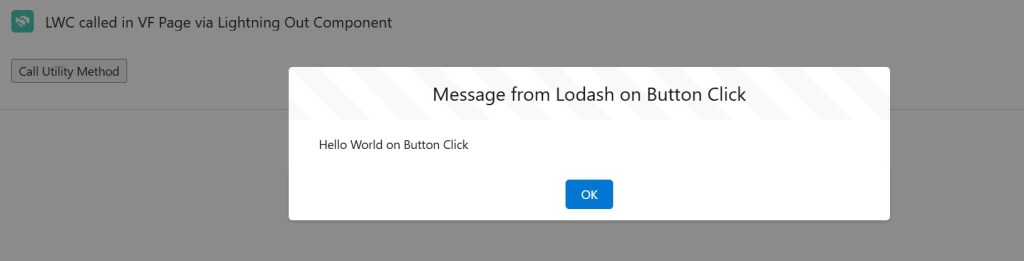
LWC call the myUtilityFunction of VF using invokeUtilityMethod property on “Call Utility Method” button click
  1. Page Load:
    • The Visualforce page dynamically loads Lodash.js and defines the global method.
    • The Lightning Out framework initializes the LWC and passes the method as a property.
  2. Rendered Callback:
    • The LWC invokes the global method on load, passing a parameter.
    • The response is displayed in an alert.
  3. Button Click:
    • Clicking the button in the LWC triggers the global method with a different parameter.
    • The new response is displayed in an alert.

Some Practical Use Cases Embedding LWC in External Websites via Lightning Out WHERE VF Pages can be used for initial pOC and Testing

You can embed LWC components into external websites using Lightning Out. This involves creating a Lightning Out application and including the necessary scripts in your external site’s HTML. This setup allows the external website to host Salesforce components and interact with them.

Reference: Salesforce Architects , Salesforce Lightning Out Markup

You can use the VF page to test the scenarios below first in Salesforce. This approach mimics the behavior of an external website. Do this before using the actual LWC on external websites.

  • Customer Support Chat Widget
    • Scenario: An external website integrates a Salesforce-powered customer support chat widget built in LWC.
    • Example: The website provides a script to track user behavior (e.g., current page, time spent), which the LWC uses to create contextual chat interactions.
    • How:
      • The website passes methods like getCurrentPage() or trackSession() to the LWC.
      • The LWC uses these to log activity or suggest pre-filled queries in the chat.
  • Custom Checkout Page for E-Commerce
    • Scenario: An external e-commerce website wants to use Salesforce data for checkout but retains its own frontend design and logic.
    • Example: The LWC fetches pricing, inventory, and shipping details from Salesforce. The external site handles custom payment scripts or UI flows.
    • How:
      • The external site passes methods like calculateDiscounts or validatePaymentDetails to the LWC.
      • The LWC calls these methods to get additional data for processing.
  • Lead Capture Forms
    • Scenario: An external marketing site embeds an LWC for lead capture, with custom validation provided by the website.
    • Example: The LWC handles record creation in Salesforce, but field validations are driven by scripts from the external site.
    • How:
      • The website passes methods like validateLeadFields(fieldData) to the LWC.
      • The LWC invokes these methods before submitting the data to Salesforce.

Conclusion

This solution shows how to overcome the isolation boundary between Visualforce and LWCs. It leverages dynamic script loading and the Lightning Out framework. Developers can create highly interactive and responsive applications. They do this by defining reusable global methods and passing them as attributes. This approach bridges the gap between legacy and modern Salesforce technologies. This approach showcases the potential of integrating Visualforce and Lightning Web Components effectively and securely. This integration ensures that while the frameworks operate within their constraints, they can collaborate seamlessly, offering a cohesive user experience.

References –

Leave a comment